*Only Base Admins have access to Configuration Settings*
Select Configuration from the left hand menu. Navigate to the Upcoming Trip Action Interval Section:

Here you can select the period from pickup time, in minutes, that a trip will be marked as urgent. The period must be between 15 and 90 minutes.
Urgent Trips will be now be displayed in the trip list:
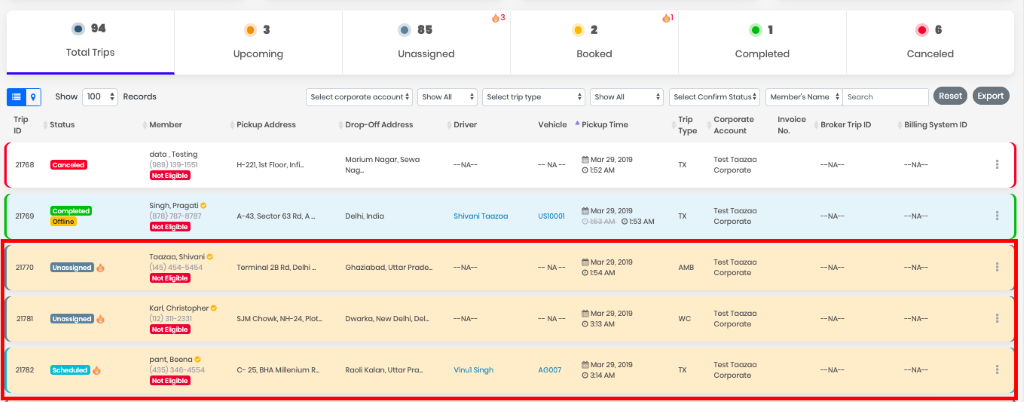
Urgent Trips will be highlighted in the Unassigned Trip List, Total Trips List and the Booked Trip List. If an Urgent trip is picked up by a driver, it will no longer be marked as urgent and the trip urgent flag will update in few moments. If the trip is not started by the assigned driver, it will again show as an urgent trip on the Booked Trip List.
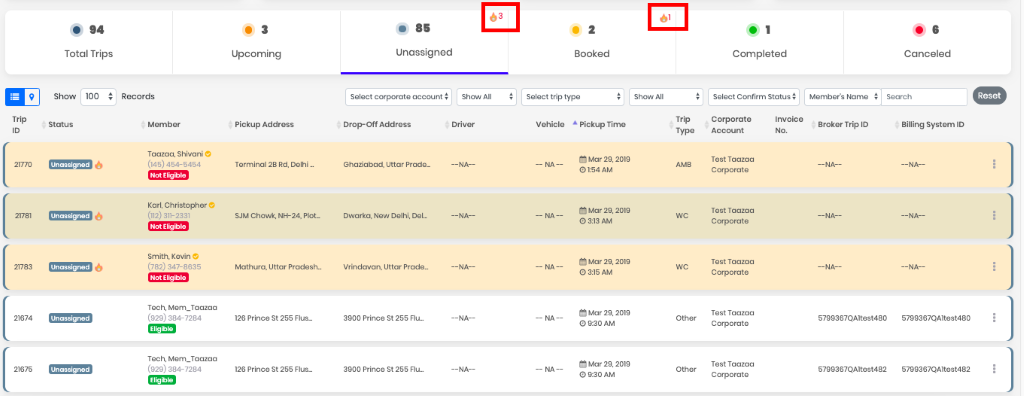
You can see the total count of all the urgent trips in Unassigned and Booked Trip Lists:
0 Comments