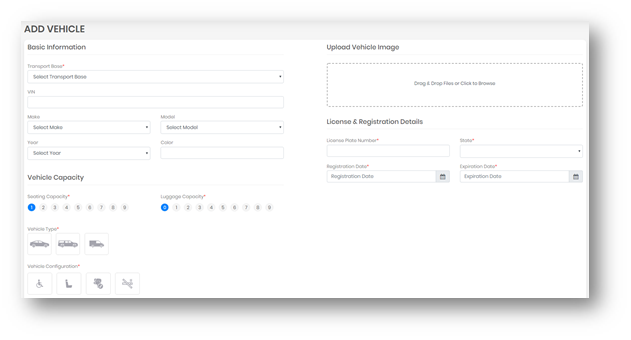
To add a vehicle to the dispatch system, you will need the following:
- Basic Info (Make/Model/Color etc.)
- License & Registration Information
- Vehicle Capacity
- An Image of Vehicle
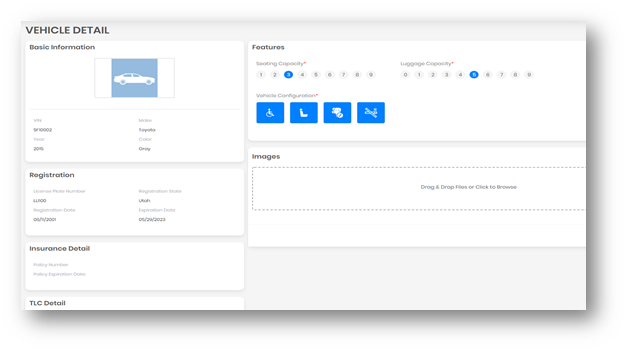
A vehicle can also have other relevant information, which may not be mandatory for creating adding it to the system. Those details include insurance information, TLC details, and images. These all can be added along with the basic information as provided in the Create Section. User can go into the details of a vehicle from the List Screen. When a user moves the mouse over a particular section, it brings the option to modify the data in that section.
Adding Vehicles from Transit Billing:
A base and super admin both can add Vehicles from transit billing. Click on Vehicles from left menu Then click on the Transit billing. This will expose all vehicle data from your respective broker accounts. (MAS, Logisticare).

Click on the action "Add to Transit Partners".
 Clicking on this will open a form, Add Vehicle where details added from billing will be display clicking on save will add this Vehicle in Dispatch.

Adding a new Make or Model Vehicle:
To add a new make/model vehicle type do the following:
1. Select Fleet --> Vehicles
2. Click on Add Vehicle
3. Select Add New Make from the Make drop down menu

4. Enter make name and click the green check mark to add

The same steps are required for adding a new Model.
0 Comments